AI Folder Organiser: offline AI that sorts files by what’s inside A case study by Ansh Kapuriya
Today
Hi, I’m Ansh. I built AI Folder Organiser. Ask me anything about it.
I’ve typed your first question below. Just press send.
What does the AI Folder Organiser do?
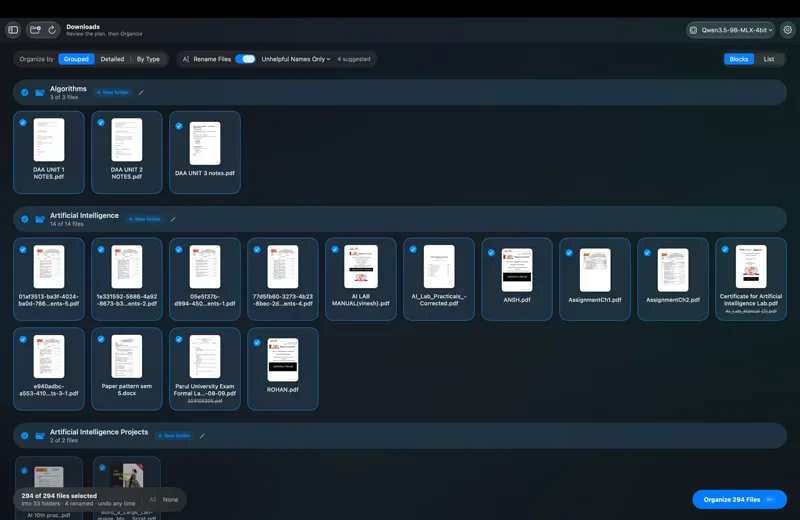
It cleans up a messy folder by reading what’s inside each file, not just its name. Then it groups related files into folders and gives badly named files clear names.
Everything runs on your own computer.
- Type
- Offline desktop app
- Runs on
- macOS and Windows
- AI
- EmbeddingGemma 2 and a small local model
- Result
- 294 files into 33 folders, one click
Why not just sort files by type or date?
Because document(3).pdf, scan_0012.pdf and final.pdf tell you nothing. A receipt, a ticket and a contract are all just PDFs.
You have to open them to know what they are. So the app opens them for you.
How does it know what a file is about?
- Read: the first pages of PDFs, Word and PowerPoint files, the text of notes and code, and the pixels of images and scans.
- Understand: Google’s EmbeddingGemma 2 turns each file into a point in a 768-dimensional “meaning space”. An Uber receipt lands next to an Ola invoice, even with no words in common.
- Group: files are clustered by meaning. Exact copies and re-saved PDFs go into a Duplicates folder.
- Name: a small local language model names each folder the way a person would, like “Travel Documents”, and suggests clear file names.
- Review: you see the plan, untick anything that should stay put, and click Organize.
Does any of my data get uploaded?
No. No account, no cloud, no upload. The models run on the computer itself: Apple silicon, an NVIDIA graphics card or a plain CPU.
That’s what makes it usable for private files, like client contracts, medical records or bank statements.
What if it renames something wrong?
Every suggested name is checked against the document. If a date, company or person in the name isn’t in the file, the name is thrown out.
So IMG_3301.pdf becomes “Dosa Corner 2026-09-26.pdf” only because that’s what the receipt says.
Nothing moves until you click Organize. Files are never deleted or overwritten, and one click undoes the whole run, even after an interrupted one.
What happens when new files arrive later?
Run it again and it only looks at the new files. A clear match goes straight into the existing folder, a maybe gets double-checked by the language model, and anything else gets a new folder.
What is it built with?
One Python engine shared by two native apps: SwiftUI on macOS and Qt on Windows. It finds models by itself from Hugging Face, LM Studio, Ollama or a Models folder.
It’s open source, so you can read every line.
Can you build offline AI software for my team?
Yes. Offline AI software starts at $499 and takes 3 to 5 weeks, with an installer and a handover.
It suits any team whose files can’t go to the cloud: law firms, clinics, accountants, design studios.